
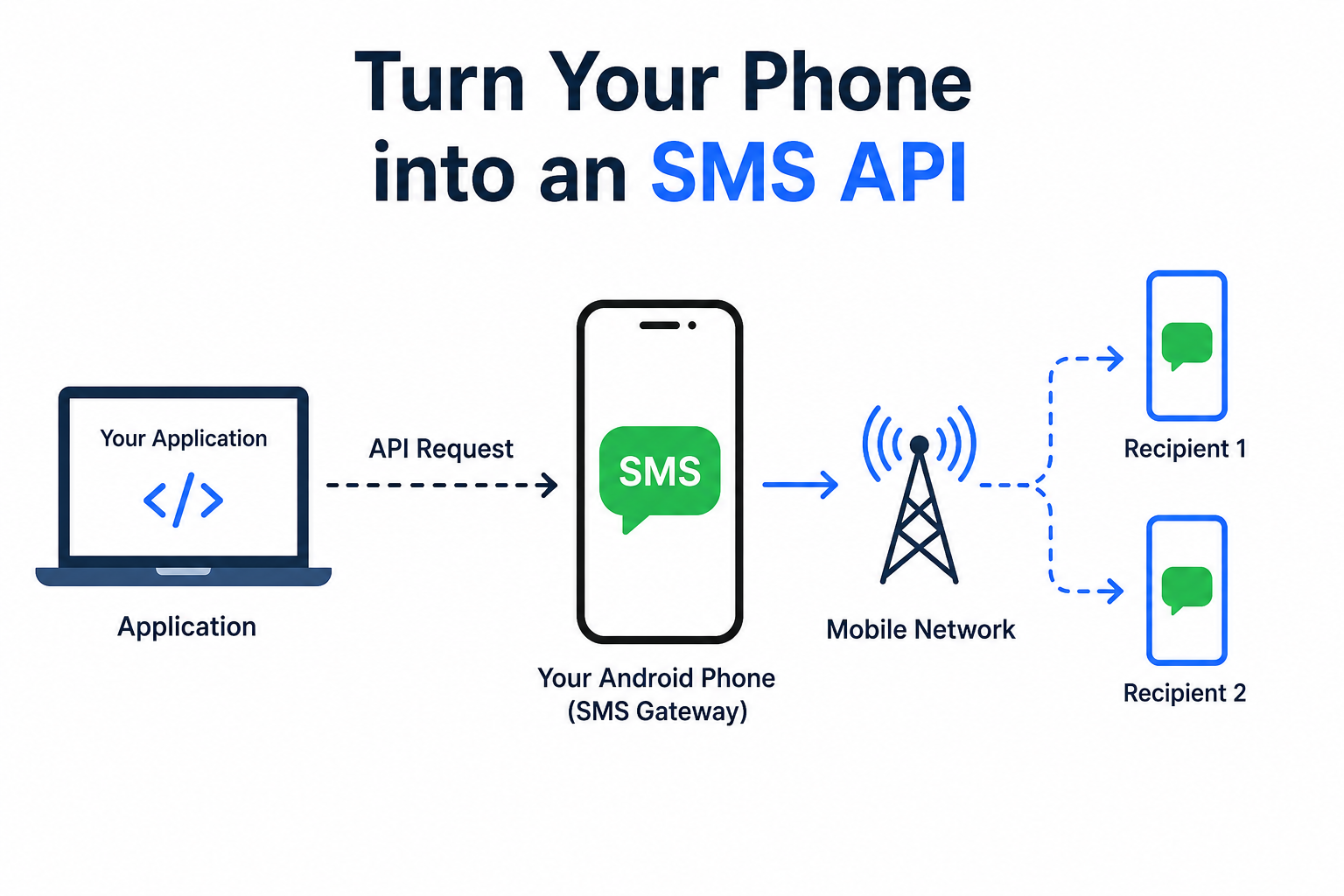
Turn Any Android Phone into an SMS Gateway Without Expensive Hardware
Need to send SMS messages directly from your application, website, CRM, or automation tool? Instead of purchasing an expensive SMS gateway, you can simply turn your Android phone into an SMS API.
Your smartphone becomes an SMS gateway that sends and receives messages using your existing SIM card and mobile network.
Whether you’re building a business application, appointment reminder system, OTP service, or customer notification platform, this guide will show you how to get started.
What is an SMS API?
An SMS API (Application Programming Interface) allows software applications to send and receive SMS messages programmatically.
Instead of manually typing messages, your application sends a request to an API, which then delivers the SMS to the recipient.
Common Use Cases
- OTP Verification
- Appointment Reminders
- Customer Notifications
- Order Updates
- Delivery Alerts
- School Notifications
- CRM Integration
- Marketing Campaigns
- Two-Factor Authentication (2FA)
Why Use Your Phone as an SMS API?
Using your Android phone as an SMS gateway has several advantages:
- Low Cost
No expensive SMS gateway required.
- Easy Setup
Install an app and connect it with your application.
- Uses Your Existing SIM
No need to purchase additional SMS credits immediately.
- Works Anywhere
As long as your phone has internet and cellular signal.
- Perfect for Developers
Great for testing applications before scaling.
How It Works
Website / App
│
▼
SMS API
│
▼
Android Phone
│
▼
Mobile Network
│
▼
Recipient
What You’ll Need
- Android Phone
- Active SIM Card
- Internet Connection
- SMS Gateway App
- API Key
- Your Website or Application
Popular Apps That Turn Your Phone into an SMS API
1. SMS Gateway API
A lightweight solution that converts your Android device into an SMS gateway.
Features:
- REST API
- Receive SMS
- Send SMS
- Webhooks
- Delivery Reports
Official Website:
2. SMS Gateway by CloudSMS
Suitable for developers looking for enterprise-level messaging.
Website:
3. Tasker + Automation
Advanced users can automate SMS sending using Tasker and webhooks.
Website:
4. Twilio
If you eventually outgrow a phone-based gateway, Twilio provides scalable SMS APIs worldwide.
Website:
Step-by-Step Setup Guide
Step 1: Install an SMS Gateway App
Download and install your preferred SMS Gateway application from the Play Store.
Grant permissions:
- SMS
- Phone
- Notifications
- Background Activity
Step 2: Insert Your SIM Card
Use an active SIM card with:
- SMS balance
- Good signal
- Internet connection
Step 3: Connect Your Phone
Most gateway apps generate:
- Device ID
- API Token
- Endpoint URL
Example:
Step 4: Send Your First SMS
Receiving SMS
Most SMS gateway apps also support receiving messages.
Incoming SMS can trigger:
- CRM updates
- Lead generation
- Ticket creation
- Email notifications
- WhatsApp automation
- Database storage
Automation Examples
OTP Verification
User enters phone number
↓
Website requests SMS API
↓
Phone sends OTP
↓
User verifies account
Order Confirmation
Customer places order
↓
Website sends API request
↓
Phone sends confirmation SMS
↓
Customer receives notification instantly
Appointment Reminder
Hospital Database
↓
API Request
↓
Android Phone
↓
Patient receives reminder
Best Practices
- Keep your phone charged.
- Enable automatic app startup.
- Use a stable Wi-Fi or mobile data connection.
- Disable battery optimization for the SMS gateway app.
- Monitor SMS usage to avoid carrier limits.
- Secure your API key and rotate it if compromised.
Limitations
Phone-based SMS gateways are excellent for small and medium workloads but may not be suitable for:
- Sending thousands of SMS per hour
- High-availability enterprise systems
- Global messaging with guaranteed delivery
- Advanced analytics and compliance requirements
For larger deployments, consider cloud SMS providers.
Frequently Asked Questions (FAQs)
Can I use any Android phone?
Yes, most Android devices running modern versions of Android can function as an SMS gateway.
Is it free?
The gateway app may be free or paid, but your mobile carrier may still charge for SMS messages according to your plan.
Can I receive SMS using the API?
Yes, many SMS gateway apps support inbound SMS and webhooks.
Is it secure?
Yes, if you use HTTPS, strong API keys, and keep your device protected with regular updates and a secure lock screen.
Conclusion
Turning your Android phone into an SMS API is one of the easiest and most affordable ways to integrate SMS functionality into your applications. It’s ideal for developers, startups, and small businesses that want to automate notifications, OTPs, reminders, and customer communication without investing in dedicated SMS gateway infrastructure.
As your messaging needs grow, you can transition to enterprise providers like Twilio or similar services while keeping the same API-driven workflow.
Helpful Resources
- Android Developers: https://developer.android.com/
- Twilio SMS Documentation: https://www.twilio.com/docs/sms
- Postman API Platform: https://www.postman.com/
- cURL Documentation: https://curl.se/docs/
- REST API Tutorial: https://restfulapi.net/