

If you run a PHP-based website or application, you might have heard the term PHP Worker Nodes. Many people ignore this concept, but in reality, PHP workers play a very important role in your website’s speed, performance, and user experience.
In this blog, we will explain PHP Worker Nodes in simple language, with real-world examples, so even beginners can understand how they work and why they matter.
What Are PHP Worker Nodes?
A PHP Worker Node (commonly called a PHP worker) is a process that handles a single PHP request at a time.
Whenever a user visits your website:
- A request is sent to the server
- A PHP worker picks up that request
- The PHP code is executed
- The response is sent back to the user
Each PHP worker can handle only one request at a time.
If all PHP workers are busy, new visitors must wait until a worker becomes free.
Why PHP Worker Nodes Are Important
PHP worker nodes directly affect:
- Website loading speed
- Ability to handle traffic
- Server response time
- Overall user experience
If you have too few PHP workers, your website may:
- Load slowly
- Show timeout errors
- Crash during traffic spikes
This is why understanding PHP workers is important for developers, DevOps engineers, and website owners.
How PHP Worker Nodes Work (Simple Flow)
Here is a basic flow of how PHP workers operate:
User Request → Web Server → PHP Worker → PHP Processing → Response
Real-World Example
Imagine a small restaurant:
- The customers are website visitors
- The chefs are PHP workers
- Each chef can prepare only one dish at a time
If:
- 2 chefs are available
- 2 customers order food → no problem
- 5 customers order food → 3 customers must wait
Similarly, if your website has 2 PHP workers and 5 users send requests at the same time, only 2 requests are processed immediately.
PHP Worker Nodes in WordPress
WordPress heavily depends on PHP.
When a visitor:
- Opens a page
- Submits a form
- Logs in
- Uses a plugin
A PHP worker is used.
If PHP workers are busy:
- Admin panel becomes slow
- Pages take longer to load
- Visitors see “504 Gateway Timeout”
This is very common on shared hosting plans
PHP Worker Nodes in Laravel
Laravel applications also rely on PHP workers, especially for:
- API requests
- Background tasks
- User authentication
- Database operations
High-traffic Laravel apps require more PHP workers to handle concurrent users smoothly.
PHP Worker Nodes vs CPU Cores
Many people confuse PHP workers with CPU cores, but they are different.
| PHP Workers | CPU Cores |
| Handle PHP requests | Handle all system tasks |
| Limited by PHP-FPM | Hardware-based |
| Used by web apps | Used by entire server |
Even if your server has many CPU cores, low PHP workers can still cause slow performance.
How Many PHP Worker Nodes Do You Need?
There is no one-size-fits-all answer, but here are some guidelines:
- Small blog: 2–4 PHP workers
- Medium traffic site: 4–8 PHP workers
- E-commerce or high traffic site: 8–16+ PHP workers
Factors that affect PHP worker needs:
- Traffic volume
- Plugin usage
- PHP code quality
- Caching setup
What Happens When PHP Workers Are Fully Used?
When all PHP workers are busy:
- New requests go into a queue
- Pages load slowly
- Users experience delays
- Server may show timeout errors
This situation is known as PHP worker saturation.
Common Errors Due to Low PHP Workers
Some common issues include:
- 504 Gateway Timeout
- Slow admin dashboard
- Checkout page delays
- API request failures
These problems are often misunderstood as server issues, but the real cause is insufficient PHP workers.
How to Increase PHP Worker Nodes
Depending on your hosting provider, you can increase PHP workers by:
- Upgrading your hosting plan
- Switching to VPS or Cloud hosting
- Adjusting PHP-FPM settings
- Optimizing PHP code
Most shared hosting plans have limited PHP workers.
Best Practices for Managing PHP Worker Nodes
Here are some practical tips:
- Use caching (Redis, OPcache, page cache)
- Reduce unnecessary plugins
- Optimize database queries
- Avoid heavy PHP scripts
- Use CDN for static files
Better optimization reduces PHP worker usage.
PHP Workers and Caching
Caching plays a big role.
When caching is enabled:
- Fewer PHP requests are needed
- PHP workers remain free
- Website loads faster
This is why caching is highly recommended for PHP applications.
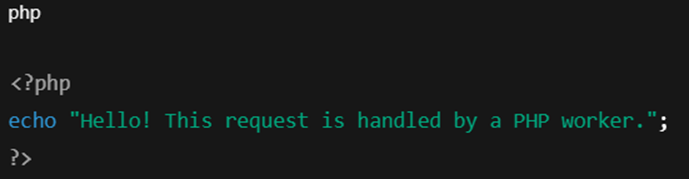
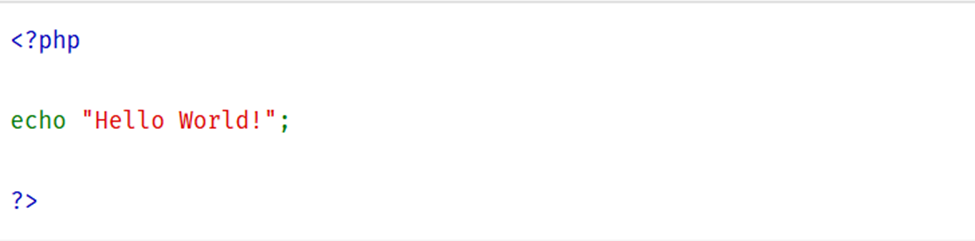
Simple PHP Example
Here is a very basic PHP script handled by a PHP worker:
Example 1:
Example 2:
When Should You Worry About PHP Workers?
You should monitor PHP workers if:
- Your website gets more traffic
- Pages start loading slowly
- You see frequent timeout errors
- Admin dashboard feels laggy
Monitoring tools and hosting dashboards can help track worker usage.
Conclusion
PHP Worker Nodes are a critical part of PHP-based websites and applications. They control how many requests your server can handle at the same time.
By understanding PHP workers, you can:
- Improve website speed
- Handle more traffic
- Avoid performance issues
- Deliver a better user experience
Whether you are running WordPress, Laravel, or any PHP application, proper PHP worker management is essential.